What it does
Calderkit MCP Server is an Odoo module that exposes an MCP endpoint at /mcp on your own Odoo. The free module provides seven read-only tools for discovering allowed models and fields, searching and reading records, counting records and calculating grouped totals. It supports Odoo 18, 19 and 20, Community and Enterprise, on Odoo.sh or a self-hosted installation. It is not a hosted service at calderkit.com.
The Model Context Protocol (MCP) is the standard way for AI assistants to use outside tools. Once connected, an MCP client such as Claude, ChatGPT, Cursor or VS Code can answer questions about your records in plain language.
Example on the Odoo demo database. You ask: “Which confirmed sales orders are the largest?” The assistant calls the search tool on Sales Order, filtered on confirmed orders and sorted by total, and answers: “S00020 for Joel Willis (3,389.63), then S00004 (2,240.00) and S00007 (1,706.00), both for Gemini Furniture.”
The tools the assistant gets:
- Context: who is connected, the company, the language, the time zone and today's date, so “last quarter” means the right dates.
- Models and fields: which models it may use, with a hint for each, and their fields.
- Search, read and count: any Odoo domain, sorted, paged, with the total number of matches.
- Totals by group: for example revenue per customer per month, without reading thousands of records.
- Create and update (Pro only): on the models you open for changes, directly or after a person approves.
Free and Pro
| MCP Server | MCP Server Pro | |
|---|---|---|
| Price | Free | $89 per Odoo version |
| Read tools: search, read, count, totals | Yes | Yes |
| API-key authentication, where the client supports it | Yes | Yes |
| OAuth sign-in with each user's own Odoo account | No | Yes |
| Create and update records | No | Per model: read only, approve first, or allowed |
| Approval of changes in Odoo | No | Yes |
| Daily limits per user | No | Yes |
| List and disconnect connected applications | No | Yes |
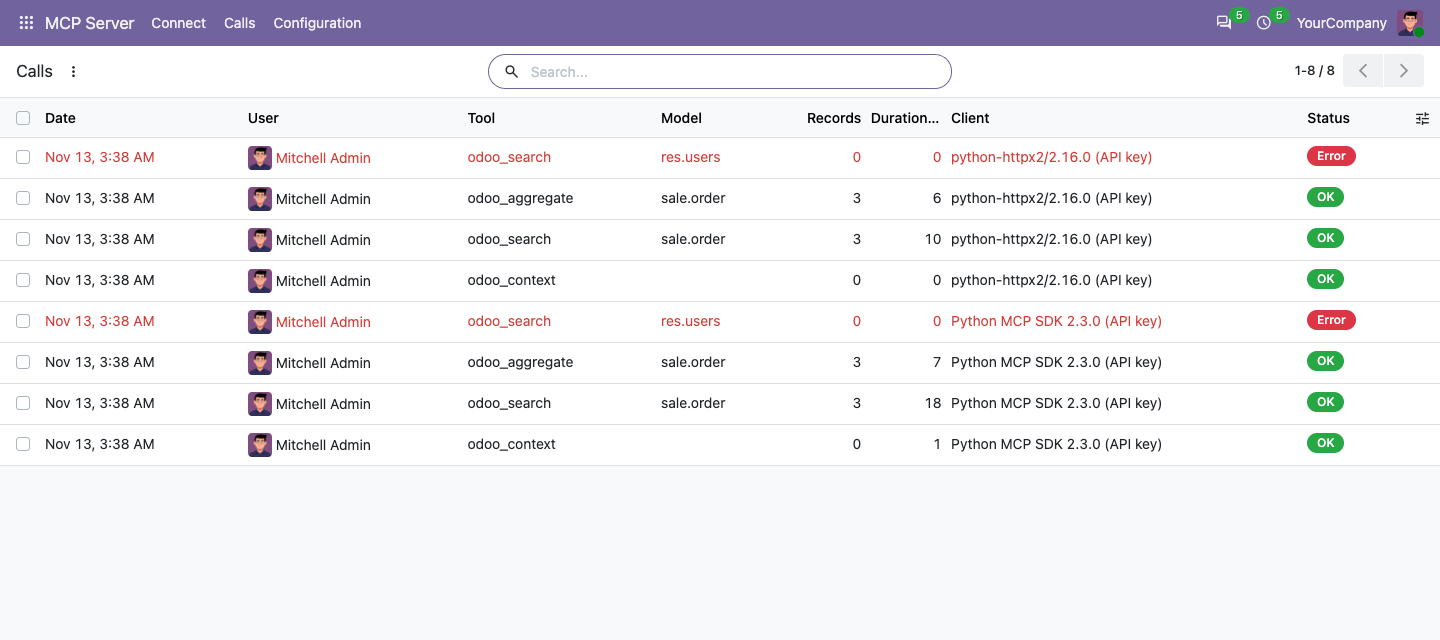
| Log of every call | Yes | Yes |
Client support depends on each client's connection options, plan and workspace settings. A shared API key uses the permissions of that key's Odoo user; it does not give each AI user a separate Odoo identity. OAuth lets each user sign in with their own Odoo account.
Pro needs the free app, which the Odoo Apps store adds for you. Deleting records is never possible, in either version.
How it keeps your data safe
- The connected account's rights. The assistant acts as the Odoo user whose API key or OAuth sign-in it uses, and sees what that user sees: record rules, companies and field groups all apply.
- Only the models you allow. An administrator picks the models and can hide more fields. Users, settings and technical tables cannot be added.
- No secrets. Passwords, tokens, keys, signatures and files are never returned, and they cannot be used in filters either.
- A key only for AI. On Odoo 20 the app adds an “MCP (AI assistants only)” scope to API keys; such a key cannot be used for any other API.
- Everything logged. Each call is recorded with the user, the tool, the model, the filters, the number of records and any error. Our Audit Log app, if you also use it, marks changes made by an AI assistant.
- Nothing goes through us. The app runs inside your Odoo. Calderkit does not relay or receive your Odoo data; the AI client you connect receives the records it asks for. Pro may download a client's small public metadata document during OAuth setup.
Connect in three steps
- Install the app from the Odoo Apps store. Administrators get access; give other users the “MCP Server / User” role.
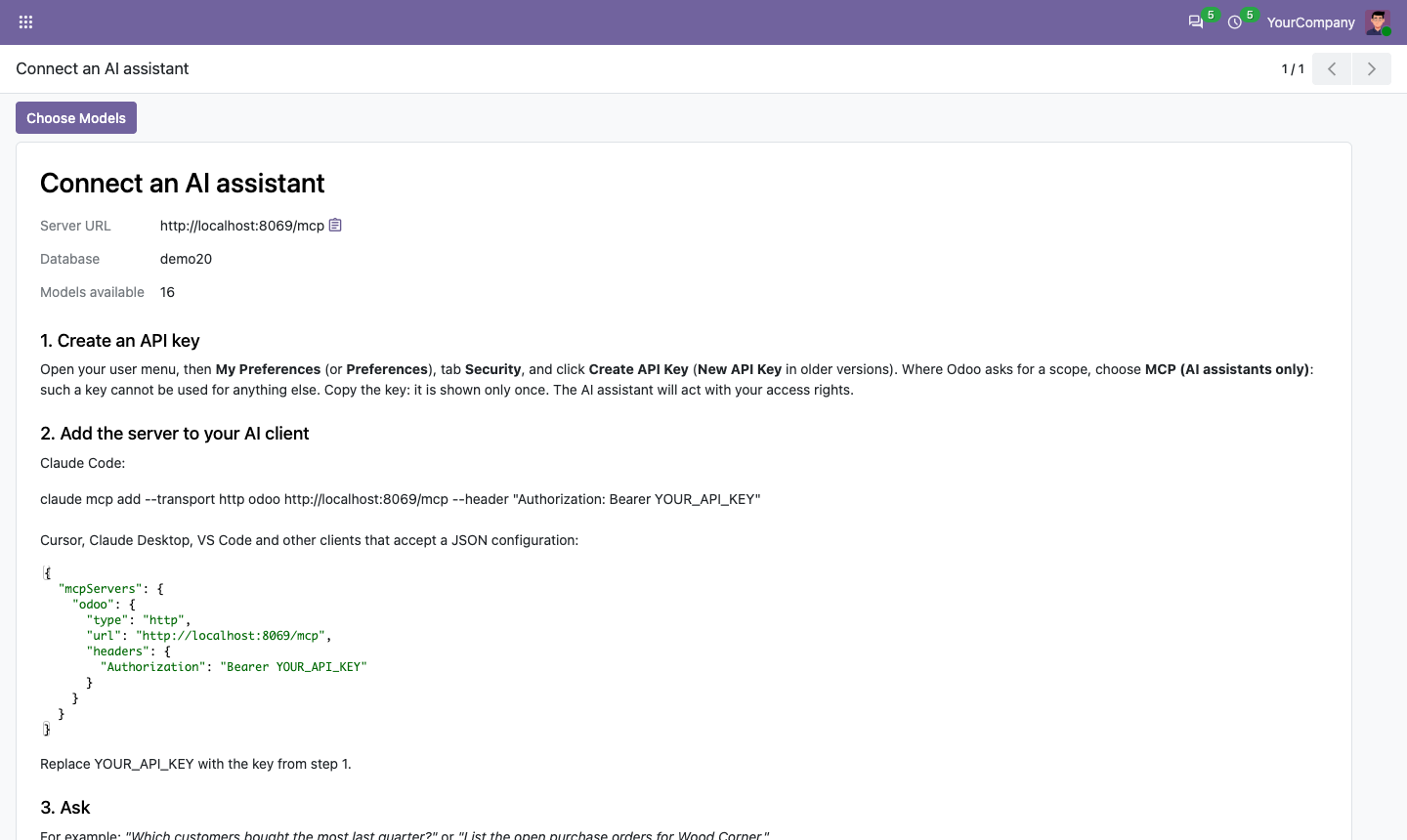
- Create an API key: user menu, Preferences, Security, Create API Key.
- Add the server to your AI client. The app's Connect page shows these snippets with your own address.
Claude Code:
claude mcp add --transport http odoo https://your-odoo.example.com/mcp \
  --header "Authorization: Bearer YOUR_API_KEY"
Example for HTTP MCP clients that accept this JSON format. File names and keys differ between clients, so check your client's documentation:
{
  "mcpServers": {
    "odoo": {
      "type": "http",
      "url": "https://your-odoo.example.com/mcp",
      "headers": { "Authorization": "Bearer YOUR_API_KEY" }
    }
  }
}
OAuth sign-in with Pro
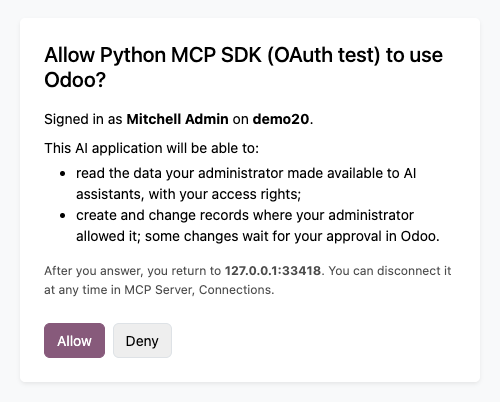
Pro provides OAuth sign-in for remote MCP clients that support it, such as custom connectors in Claude and ChatGPT where your plan and workspace allow them. You add Odoo with the address https://your-odoo.example.com/mcp. The application opens an Odoo page, the user signs in, sees what it asks for and clicks Allow. Pro implements the MCP authorization specification: protected resource and authorization server metadata, client ID metadata documents and dynamic client registration, PKCE, refresh token rotation, and the issuer in the redirect.
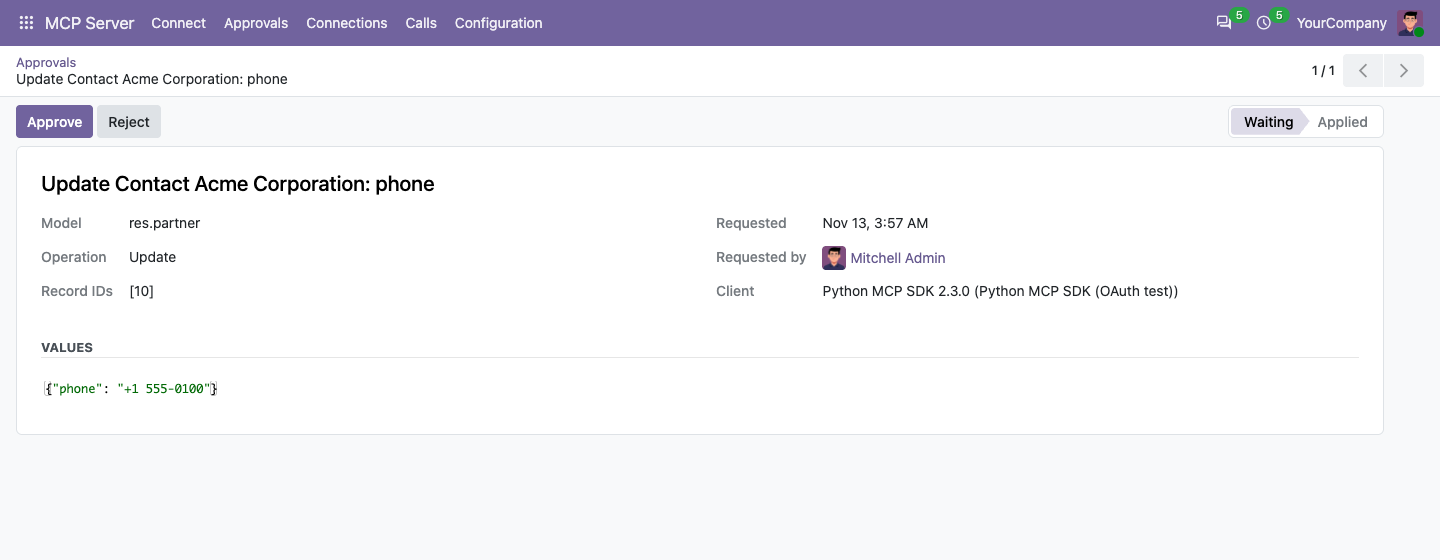
For each model, choose whether the assistant may change data: read only, approve first or allowed. With approve first, nothing changes until the user or an administrator clicks Approve in Odoo.
Charts and tables in the chat
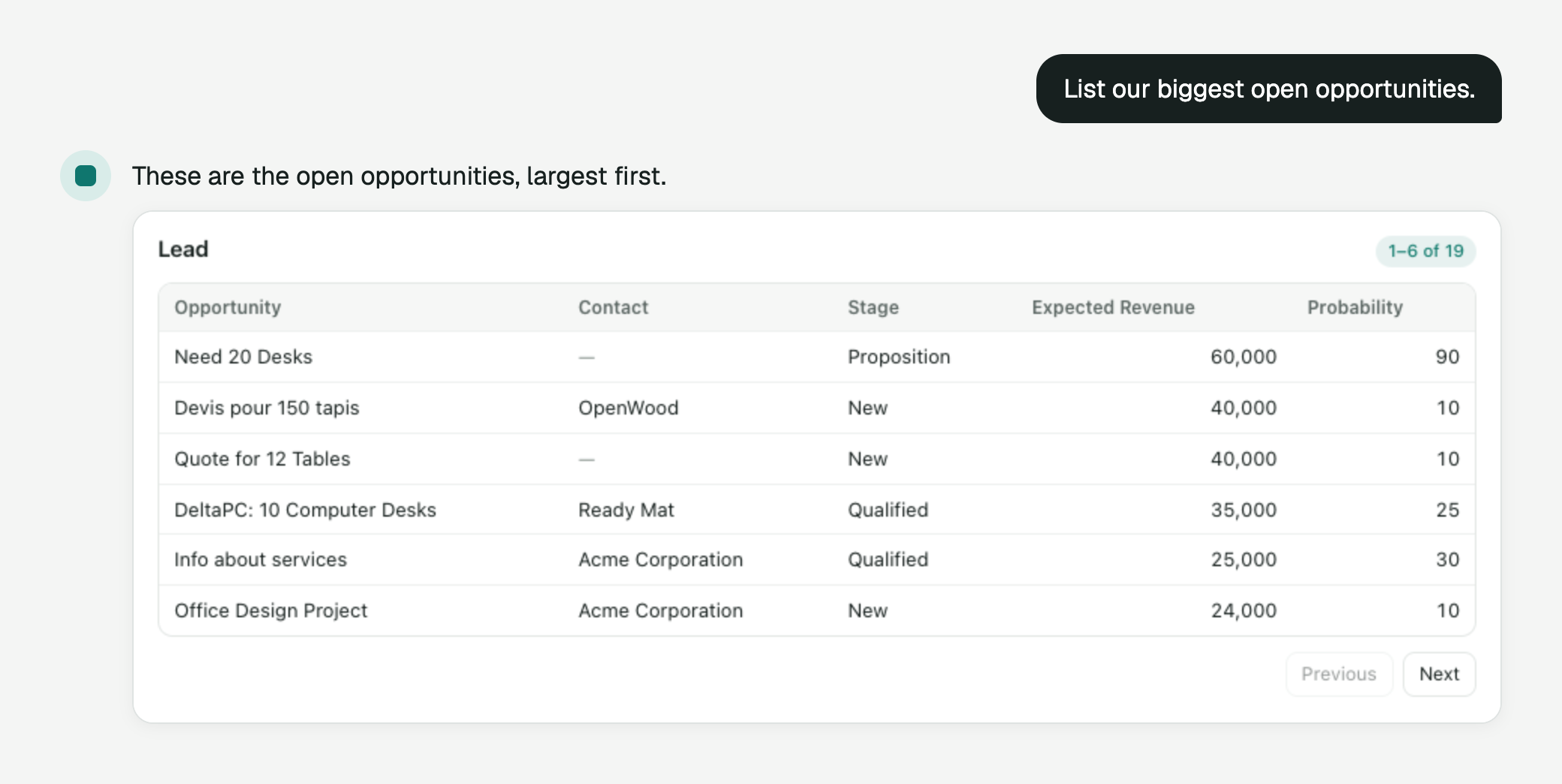
The MCP Apps add-on for MCP Server ($49 per Odoo version) lets the assistant answer with a chart, a table or a record card instead of text only. It adds three display tools to the free server: a bar, line or pie chart from grouped totals, a table of records with paging, and a card for one record with a button that opens it in Odoo. The view runs inside the chat, receives only the result of each call and loads nothing from outside, not even fonts. It reads with the same rights and allowed models as the free tools.
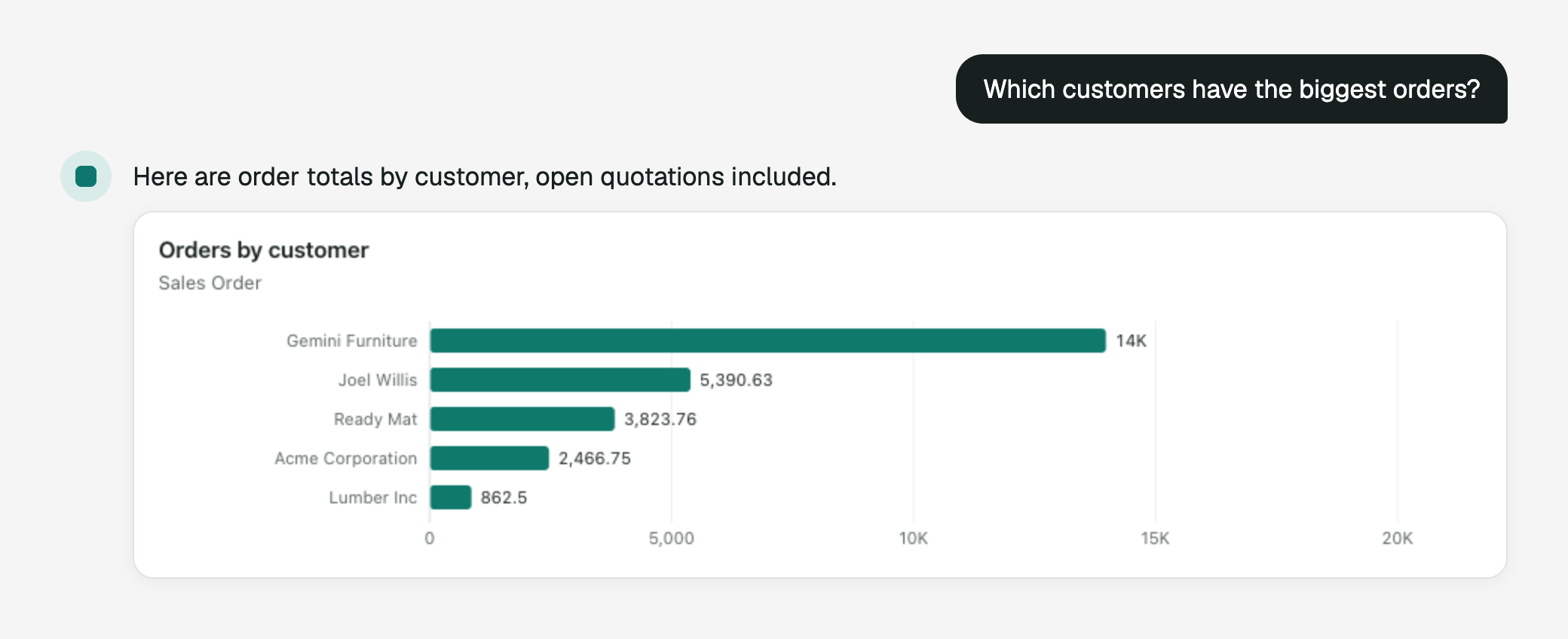
The add-on works in clients that support MCP Apps. According to their documentation these include Claude (web and desktop), ChatGPT and VS Code; Claude Code shows the text answer only. Claude on the web and ChatGPT connect with OAuth, which needs MCP Server Pro; clients that accept an API key work with the free server. We test with the official MCP Apps reference host and the MCP Python SDK.
Compatibility
- Odoo 18, 19 and 20, Community and Enterprise, on Odoo.sh or your own server. Each Odoo version is sold separately on the store.
- Not on Odoo Online: Odoo does not allow third-party apps with Python code there.
- MCP protocol 2026-07-28 (stateless, with
server/discover) and the 2025 versions that use theinitializehandshake. Tested with the official MCP Python SDK in both modes. - The address
/mcpmust lead to the right database: either the server hosts one database, or a database filter maps the hostname to it. Odoo 19 and 20 also accept anX-Odoo-Databaseheader.
Questions
Odoo 20 Enterprise has its own MCP. Why this app?
It works on Community and on Odoo 18, 19 and 20, does not use Odoo AI credits, lets you choose the exposed models, and logs every call. Pro adds changes with approval and daily limits.
Where does my data go?
Only to the AI application a user connects, in answer to its requests, and from there to the AI provider behind it. When an application identifies itself with a metadata URL, Pro downloads that small public document to check its return address.
Can the assistant delete records?
No. There is no delete tool.
Can I use the free module with Claude's web connector?
Claude documents request-header authentication for some organizations as a limited beta. Where it is available, a connector can send an Odoo API key in the Authorization header. We have not yet verified this setup end to end. Pro provides OAuth sign-in for clients that support it.
Do you see our data or keys?
No. Calderkit does not receive your Odoo records or credentials. The AI client you connect holds the API key you configure, or the token granted at sign-in, so review that client's data handling before connecting it.
Support
Buyers can use the support button on their Odoo Apps order page. For anything else, write to odoo@calderkit.com. We answer in writing within two business days.